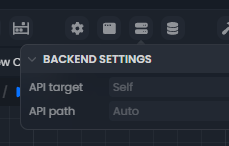
Oops, I’m sorry, I swear I thought I had answer this… Well, this wasn’t implemented, they have been removed.
Now, the backend settings contain:
- A proxy setting in the case you’re using it (which will concern 0.00001% of the users, but currently one big user)
- A cookie secret settings for securing cookies (but you won’t need to change that unless you want to revoke all the cookies of your production app)
Proxy settings is use for ngrok for to give external https access to local development server?
If I understood correctly, it will be possible to immediately test and work with real data for servers requiring mandatory SSL on the client without building the project?
For now, the proxy is only applied on builds from the desktop version of Luna Park. It adds a proxy to all fetch request.
The use case is for offline servers that rely on a special proxy for resources/internet access and needs it to do some requests against an API.
For now, it’s not applied during development. Would you need this?
As I said earlier, I am interested in trying LP in the development of the Telegram WebApp (Mini App), and there the only valid connection to the application is https. That is, you will have to deploy the application to a development server connected to a domain with SSL.
Also, for my Directus instance, client connection is allowed only over HTTPS.
It’s not critical right now, I’m still making tentative progress in understanding the logic and components of LP. I don’t think I’m ready for practical applications yet.
Well, deploying a Luna Park app with SSL is relatively easy with Nginx and Let’s encrypt.
Nginx will redirect the HTTPS traffic to the Luna Park server that listen on port 3080 by default. If you need help with that kind of setup, feel free to ask!
In any case, no need for proxy for this particular use case.
Yes, maybe I haven’t tried it yet.
I meant connecting ngrok (or an analog) tunnel to the local project server located on the PC (of course, I haven’t gotten to that point yet, but LP should have a local web server for previewing and testing the entire project.), to instantly develop with live data without having to deploy a project, this scares me the most, as a beginner, after each operation I want to check if I did everything right and if it works as I expect.
At least that’s how it works in other programs, I don’t think it’s any different in LP.
So you should already be able to preview your data in the editor.
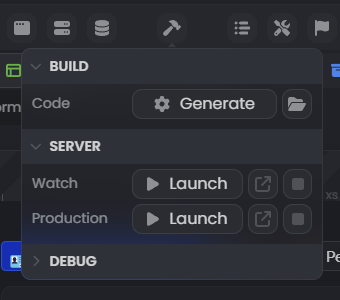
But you can also spin a dev server, just click on “generate”, then launch the dev server to have a browser with your project and hot-reload.
I didn’t quite get it.
If I press Watch - LP run its web server on some port and it will be possible to forward a tunnel to it for online previw all Project App?
I admit, I’m not quite sure of what you want to do, too…
If I press Watch - LP run its web server on some port
Exactly, it will spin up a dev server on port 1980 for the frontend, and 3080 for the backend
it will be possible to forward a tunnel to it for online previw all Project App
Well, you can already preview your app directly by visiting http://127.0.0.1:1980 when the server is launched. You can click on the litle arrow next to the launch button to open it.
it will be possible to forward a tunnel to it for online previw all Project App
If you want to make the preview visible on internet, you’ll have to redirect your incoming traffic to the port 1980 manually, Luna Park does not do that for you yet. But yes, it’s possible!
Now, if you want to communicate with some stuff using ngrok, this npm package can be used within Luna Park: ngrok - npm (once again, I’m not familiar with ngrok, but I believe it will let you communicate with some APIs hosted there?)
Yes, I would like to repeat the path described in the article: Sharing Local URLs with Ngrok - Hosting and Cloud Platforms - Wappler Community
I want to try to make an example Hello World for Telegram MiniApps.
A mandatory requirement is to connect the application via HTTPS.
A simple conclusion is how to create a tunnel to the local server, and make the application address in the bot to the temporary development address https://xxxx.ngrok.com (not necessarily ngrok, there are hundreds of other analogues).
It is necessary to somehow receive and track responses from the server and send requests to the telegram server.
Otherwise, how to understand how to interact with the Telegram API besides tracking real data.
Now I understand that we can create a local web server in LP and try to throw tunnel to this server in order to connect to it using a temporary https address.